Segmentation Without Training: SAM2
SAM2 is the successor of the Segment Anything Model (SAM) [19]. Like SAM, it outlines objects in new kinds of images without further training, starting from a simple prompt such as a point.
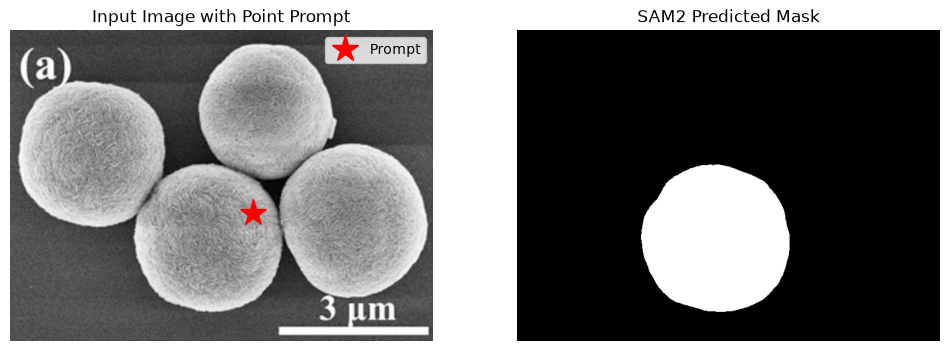
This notebook uses SAM2 to segment one object in an SEM image from a single point. We use the same image and the same point as in the SAM notebook (example_sam1.ipynb), so the two masks can be compared by eye.
JuSPICE Modules and Classes
juspice.io:load_data,save_data,SPICEDatajuspice.segmentation_module:UNetSegmentationAccessor(viaspice.segmentation)juspice.synth_data_module:ConfigLoaderjuspice.tracking:Tracker
[1]:
from juspice.tracking import Tracker

tracker = Tracker(include_metadata=True, notes='Zero-shot segmentation with SAM2')

tracker.recording_start()
/Users/amir/GIT_repositories/juspice_pre_release/venvs/.venv/lib/python3.12/site-packages/tqdm/auto.py:21: TqdmWarning: IProgress not found. Please update jupyter and ipywidgets. See https://ipywidgets.readthedocs.io/en/stable/user_install.html
  from .autonotebook import tqdm as notebook_tqdm
[2]:
# --------- Block 0: Setup ----------

# Standard library
from pathlib import Path
import sys
import os
import json
import logging
import shutil

# Third-party
import numpy as np
import matplotlib.pyplot as plt
try:
    import torch
    _torch_available = True
except ImportError:
    torch = None
    _torch_available = False
    print("WARNING: torch is not installed. Device selection will default to 'cpu'.")

# JuSPICE
from juspice.io import load_data, save_data, SPICEData
from juspice.synth_data_module import ConfigLoader

# Paths
try:
    notebook_dir = Path(__file__).resolve().parent
except Exception:
    notebook_dir = Path.cwd()

cur = notebook_dir
repo_root = None
for _ in range(6):
    if (cur / 'juspice').exists() or (cur / 'pyproject.toml').exists():
        repo_root = cur
        break
    if cur.parent == cur:
        break
    cur = cur.parent
if repo_root is None:
    repo_root = notebook_dir
if str(repo_root) not in sys.path:
    sys.path.insert(0, str(repo_root))
[3]:
tracker.recording_stop()
Settings
We choose a device and locate the SAM2 model file (checkpoint) and its configuration file.
[4]:
tracker.recording_start()
[5]:
# --------- Block 1: Config and device ----------

# sam2 needed only to resolve its installed config directory
import sam2 as _sam2_pkg

_mps_available = (
    torch is not None
    and hasattr(torch.backends, 'mps')
    and torch.backends.mps.is_available()
)
if torch is not None and torch.cuda.is_available():
    device = 'cuda'
elif _mps_available:
    device = 'mps'
else:
    device = 'cpu'
print(f'Using device: {device}')

config_path = os.path.join(repo_root, 'notebooks', 'notebooks_parameters.yaml')
config = ConfigLoader(config_path)
input_image_path = os.path.join(
    repo_root, config['sample_images_dir'], '1b935635dd.png'
)

pretrained_model_dir = os.path.join(
    repo_root, config['pretrained_models_dir'], 'segment_anything2_META'
)
pretrained_model_url = 'https://huggingface.co/facebook/sam2.1-hiera-large/resolve/38e0b24f84dfe8a95d5b6cb53bc1b772cbe15dc2/sam2.1_hiera_large.pt'

os.makedirs(pretrained_model_dir, exist_ok=True)

sam2_repo = os.path.dirname(_sam2_pkg.__file__)
pretrained_model_path = os.path.join(pretrained_model_dir, 'sam2.1_hiera_large.pt')

if os.path.exists(pretrained_model_path):
    logging.info(f'SAM2 checkpoint found at: {pretrained_model_path}')
else:
    logging.info(f'Downloading SAM2 checkpoint to: {pretrained_model_path}')
    try:
        import urllib.request
        urllib.request.urlretrieve(pretrained_model_url, pretrained_model_path)
        logging.info('SAM2 checkpoint downloaded.')
    except Exception as _exc:
        logging.warning(f'SAM2 checkpoint download failed: {_exc}')

if not os.path.exists(pretrained_model_path):
    raise FileNotFoundError(
        f'SAM2 checkpoint not found at {pretrained_model_path!r} after the '
        f'download attempt. Download it manually from '
        f'{pretrained_model_url!r} and place it at that path, then re-run '
        'this cell.'
    )

config_rel_path = 'configs/sam2.1/sam2.1_hiera_l.yaml'
model_cfg = config_rel_path
config_full_path = os.path.join(sam2_repo, config_rel_path)
if os.path.exists(config_full_path):
    logging.info(f'SAM2 config found at: {config_full_path}')
else:
    logging.error(f'SAM2 config not found at: {config_full_path}')
20:08:2026 16:29:18 - Downloading SAM2 checkpoint to: /Users/amir/GIT_repositories/juspice_pre_release/Pretrained_models/segment_anything2_META/sam2.1_hiera_large.pt
Using device: mps
20:08:2026 16:31:11 - SAM2 checkpoint downloaded.
20:08:2026 16:31:11 - SAM2 config found at: /Users/amir/GIT_repositories/juspice_pre_release/venvs/.venv/lib/python3.12/site-packages/sam2/configs/sam2.1/sam2.1_hiera_l.yaml
[6]:
tracker.recording_stop()
What is new in SAM2
SAM2 (Ravi et al., 2024) [20] was designed for both images and videos:
A memory of earlier frames lets it follow an object through a video. For a single image, as here, this part is not used.
A new, more efficient image encoder (Hiera, [45]) replaces SAM’s Vision Transformer.
The architecture is described by YAML configuration files that ship with the
sam2package, which is why the settings cell looks up the package location.
SAM and SAM2 model files are not interchangeable. For single images, both give similar quality; SAM2’s main advantage is video.
Now we segment the object at the chosen point:
[7]:
tracker.recording_start()
[8]:
# --------- Block 2: SAM2 prediction ----------

# `spice` is just a variable name for the SPICEData instance load_data()
# returns here — any name would work; we use `spice` throughout these
# notebooks as an intuitive nod to JuSPICE / SPICEData.
spice = load_data(str(input_image_path))
image = spice.data

# run_sam2() derives a NEW SPICEData with the predicted mask
# — spice.data is never mutated, history lineage is shared.
input_point = [[400, 300]]
mask_spice = spice.segmentation.run_sam2(
    checkpoint_path=pretrained_model_path,
    model_cfg=model_cfg,
    input_point=input_point,
    device=device,
)

print(f'Predicted mask score: {mask_spice.metadata.get("predicted_score"):.3f}')

fig, ax = plt.subplots(1, 2, figsize=(12, 5))
ax[0].imshow(image)
ax[0].plot(input_point[0][0], input_point[0][1], 'r*', markersize=20, label='Prompt')
ax[0].legend()
ax[0].set_title('Input Image with Point Prompt')
ax[0].axis('off')
ax[1].imshow(mask_spice.data, cmap='gray')
ax[1].set_title('SAM2 Predicted Mask')
ax[1].axis('off')
plt.show()
20:08:2026 16:31:12 - Loaded checkpoint sucessfully
20:08:2026 16:31:12 - For numpy array image, we assume (HxWxC) format
20:08:2026 16:31:12 - Computing image embeddings for the provided image...
20:08:2026 16:31:15 - Image embeddings computed.
Predicted mask score: 0.973
[9]:
tracker.recording_stop()
Save and review
We save the predicted mask and print the recorded pipeline.
[10]:
tracker.recording_start()
[11]:
# --------- Block 3: Save ----------

# mask_spice IS already the SPICEData returned by spice.segmentation.run_sam2()
# — no manual wrapping needed.
# This folder holds several notebooks, so save_data()'s automatic
# notebook-name detection would be ambiguous when run outside a live
# Jupyter session (e.g. via nbconvert) — pass output_stem explicitly
# to always land on this notebook's own files. See
# docs/repository_structure.rst.
stem = 'example_sam2'
save_data(
    mask_spice,
    output_stem=str(notebook_dir / stem),
)
print(f'Data:           {os.path.join(notebook_dir, stem + ".npy")}')
print(f'JSON sidecar:   {os.path.join(notebook_dir, stem + ".json")}')
print(f'History script: {os.path.join(notebook_dir, stem + "_history.py")}')
Data:           /Users/amir/GIT_repositories/juspice_pre_release/notebooks/segmentation/example_sam2.npy
JSON sidecar:   /Users/amir/GIT_repositories/juspice_pre_release/notebooks/segmentation/example_sam2.json
History script: /Users/amir/GIT_repositories/juspice_pre_release/notebooks/segmentation/example_sam2_history.py
[12]:
# --------- Block 4: Inspect human-readable history ----------

# mask_spice.history.to_lines() reconstructs the full segmentation pipeline
# applied to this SPICEData object into readable, runnable code: the
# initial load_data(...) call followed by spice.segmentation.run_sam2(...)
# with all runtime argument values (checkpoint_path, model_cfg, input_point,
# device, etc.), and a trailing save_data(mask_spice).
readable_lines = mask_spice.history.to_lines()

print('Reconstructed segmentation pipeline for this SPICEData object:')
print('\n'.join(readable_lines))
Reconstructed segmentation pipeline for this SPICEData object:
import juspice
spice = juspice.io.load_data('/Users/amir/GIT_repositories/juspice_pre_release/Sample_data/em/1b935635dd.png')
mask_spice = spice.segmentation.run_sam2(model_cfg='configs/sam2.1/sam2.1_hiera_l.yaml', checkpoint_path='/Users/amir/GIT_repositories/juspice_pre_release/Pretrained_models/segment_anything2_META/sam2.1_hiera_large.pt', input_point=[[400, 300]])
juspice.io.save_data(spice)
[13]:
tracker.recording_stop()