Loading a STEM Image (.ser)
FEI/TIA software stores scanning transmission electron microscopy (STEM) [4] images as .ser files. Along with the image, the file keeps the pixel size and the microscope settings used during the measurement.
This notebook loads a .ser file with load_data(), inspects those settings, and checks that the image works with the standard JuSPICE tools.
JuSPICE Modules and Classes
juspice.io:SPICEData,load_data,save_dataSPICEData.preprocess: built-in preprocessing accessorjuspice.tracking:Tracker
[1]:
from juspice.tracking import Tracker

tracker = Tracker(include_metadata=True, notes='EM (.ser) io basics')

tracker.recording_start()
/Users/amir/GIT_repositories/juspice_pre_release/venvs/.venv/lib/python3.12/site-packages/tqdm/auto.py:21: TqdmWarning: IProgress not found. Please update jupyter and ipywidgets. See https://ipywidgets.readthedocs.io/en/stable/user_install.html
  from .autonotebook import tqdm as notebook_tqdm
[2]:
# --------- Block 0: Setup ----------

# Standard library
from pathlib import Path
import sys
import os

# Third-party
import numpy as np
import matplotlib.pyplot as plt

# JuSPICE
from juspice.io import SPICEData, load_data, save_data

# Paths
try:
    notebook_dir = Path(__file__).resolve().parent
except Exception:
    notebook_dir = Path.cwd()

cur = notebook_dir
repo_root = None
for _ in range(6):
    if (cur / 'juspice').exists() or (cur / 'pyproject.toml').exists():
        repo_root = cur
        break
    if cur.parent == cur:
        break
    cur = cur.parent
if repo_root is None:
    repo_root = notebook_dir
if str(repo_root) not in sys.path:
    sys.path.insert(0, str(repo_root))
[3]:
tracker.recording_stop()
Load the image
The file is read with ncempy [55]. The pixel values go to spice.data; the pixel size and all acquisition settings go to spice.metadata. Note that this reader reports the pixel size in metres (about 1.08 nm here).
[4]:
tracker.recording_start()
[5]:
# --------- Block 1: Load ----------

ser_path = os.path.join(
    repo_root, 'Sample_data', 'em', 'LMP_LATP_EDS_Location3_0001_1.ser'
)
print(f'STEM file path: {ser_path}')

# `spice` is just a variable name for the SPICEData instance load_data()
# returns here — any name would work; we use `spice` throughout these
# notebooks as an intuitive nod to JuSPICE / SPICEData.
spice = load_data(ser_path)
print(f'data_type:  {spice.data_type}')
print(f'data.shape: {spice.data.shape}')
print(f'data.dtype: {spice.data.dtype}')
print(f'pixel_size: {spice.metadata["pixel_size"]}')
print(f'pixel_unit: {spice.metadata["pixel_unit"]}')
STEM file path: /Users/amir/GIT_repositories/juspice_pre_release/Sample_data/em/LMP_LATP_EDS_Location3_0001_1.ser
data_type:  em_ser
data.shape: (1024, 1024)
data.dtype: uint16
pixel_size: [1.079526422547315e-09, 1.079526422547315e-09]
pixel_unit: ['m', 'm']
[6]:
tracker.recording_stop()
The acquisition settings describe how the image was taken, for example the electron energy (accelerating voltage, in volts) and the magnification. Keeping them with the data makes the measurement easier to interpret and repeat.
[7]:
tracker.recording_start()
[8]:
# --------- Block 2: Inspect acquisition metadata ----------

acquisition = spice.metadata['acquisition']
keys = (
    'AcceleratingVoltage', 'Magnification [x]', 'Stage X [um]',
    'Stage Y [um]', 'Microscope []',
)
for key in keys:
    print(f'{key}: {acquisition.get(key)}')
AcceleratingVoltage: 200000
Magnification [x]: 115000
Stage X [um]: 12.457
Stage Y [um]: 36.644
Microscope []: Microscope Tecnai 200 kV D485 SuperTwin
[9]:
tracker.recording_stop()
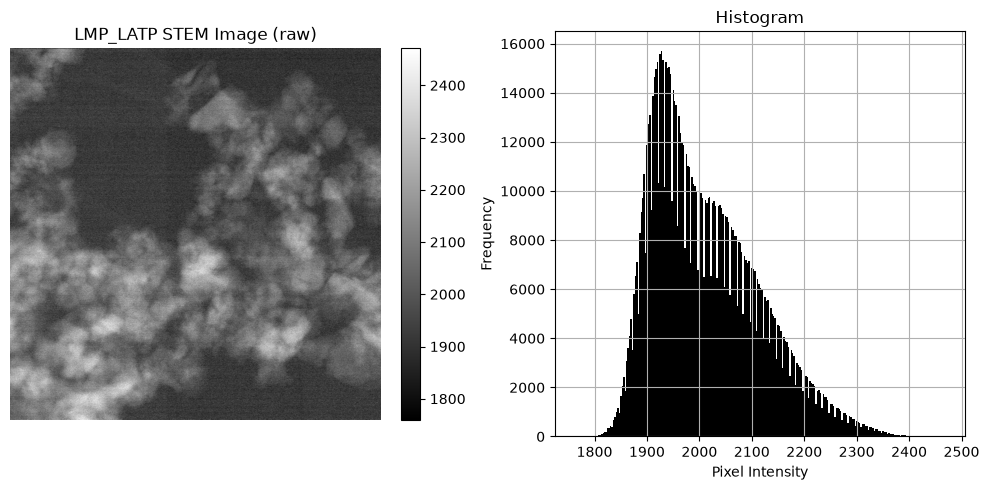
The raw image and its histogram:
[10]:
tracker.recording_start()
[11]:
# --------- Block 3: Visualize ----------

spice.preprocess.show_image(
    title='LMP_LATP STEM Image (raw)', show_colorbar=True, show_histogram=True
)
[12]:
tracker.recording_stop()
Check that the standard tools work
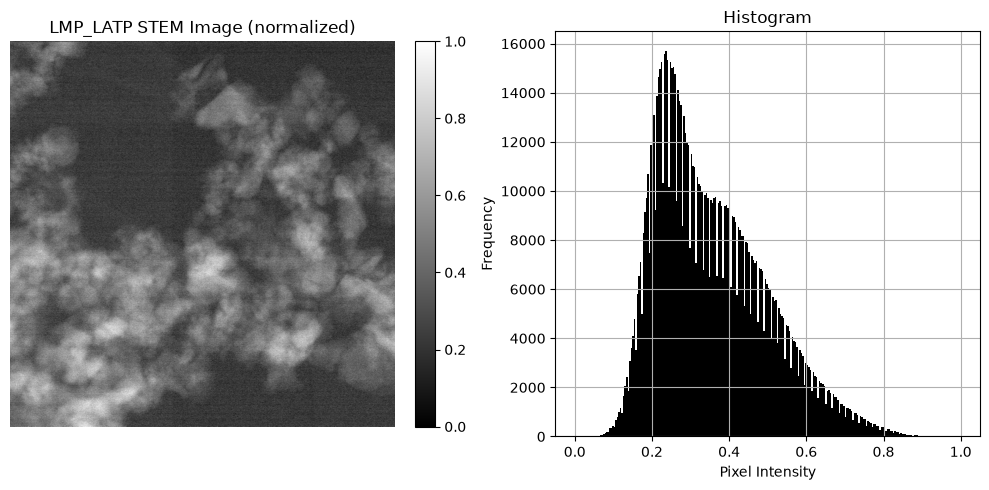
normalize() rescales the intensities to 0–1, just as it does for PNG or TIFF images.
[13]:
tracker.recording_start()
[14]:
# --------- Block 4: Normalize via spice.preprocess ----------

spice.preprocess.normalize()
print(f'Size of the normalized image: {spice.data.shape}')
spice.preprocess.show_image(
    title='LMP_LATP STEM Image (normalized)', show_colorbar=True, show_histogram=True
)
Size of the normalized image: (1024, 1024)
[15]:
tracker.recording_stop()
Save and review
Saving writes the data, its metadata, and a script that recreates it.
[16]:
tracker.recording_start()
[17]:
# --------- Block 5: Save ----------
# This folder holds several notebooks, so save_data()'s automatic
# notebook-name detection would be ambiguous when run outside a live
# Jupyter session (e.g. via nbconvert) — pass output_stem explicitly
# to always land on this notebook's own files. See
# docs/repository_structure.rst.
stem = 'io_ser'
save_data(
    spice,
    output_stem=str(notebook_dir / stem),
)
print(f'Data:           {os.path.join(notebook_dir, stem + ".npy")}')
print(f'JSON sidecar:   {os.path.join(notebook_dir, stem + ".json")}')
print(f'History script: {os.path.join(notebook_dir, stem + "_history.py")}')
Data:           /Users/amir/GIT_repositories/juspice_pre_release/notebooks/io/io_ser.npy
JSON sidecar:   /Users/amir/GIT_repositories/juspice_pre_release/notebooks/io/io_ser.json
History script: /Users/amir/GIT_repositories/juspice_pre_release/notebooks/io/io_ser_history.py
[18]:
tracker.recording_stop()
The history lists every step as runnable code.
[19]:
tracker.recording_start()
[20]:
# --------- Block 6: Inspect human-readable history ----------

readable_lines = spice.history.to_lines()
print('Reconstructed pipeline for this SPICEData object:')
print('\n'.join(readable_lines))
Reconstructed pipeline for this SPICEData object:
import juspice
spice = juspice.io.load_data('/Users/amir/GIT_repositories/juspice_pre_release/Sample_data/em/LMP_LATP_EDS_Location3_0001_1.ser')
spice.preprocess.normalize()
juspice.io.save_data(spice)
[21]:
tracker.recording_stop()